
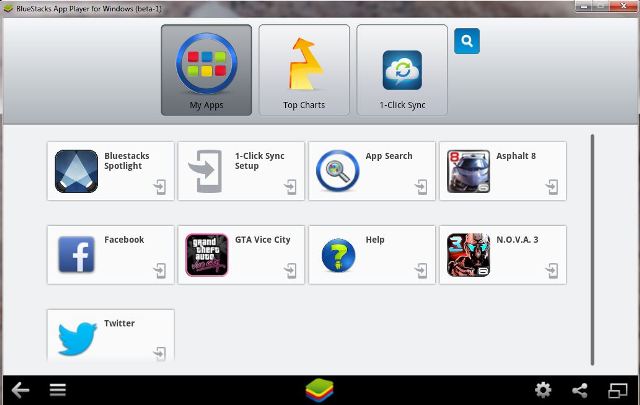
 If you have a PC/Laptop and want to play Android games on it for free and that too legally then download this software called “bluestacks”. It’s currently available to download for free(Link is below). It currently supports windows 8/7/vista/xp, Mac OS, it’s in beta phase right now but it works without any problems. Its actually an OS inside OS meaning that you are running Android on top of Windows as in emulation inside a player, the apps are not running natively on the windows which means they will not run properly on PC with weak specs. So to emulate properly you will need a powerful PC/laptop at least something with a dedicated GPU. Although you can still try with any PC/Laptop that you have.
After you download and install the software, you will see a screen similar to photo above, after that its just like using an Android phone just sign in to the play store with your Google ID and then you can download the games which are available for free on the market. Also you can install the APKs which are available for free like Subway Surfers, Fruit Ninja, Temple Run 2 directly into the Bluestacks just by double clicking on the APK.
If you have a touchscreen windows 8 laptop/PC then it would be fairly easy for you to play games like fruit ninja, if not you can still play the game with a keyboard or mouse or controller(not tried but it should work) but playing touchscreen games with keyboard won’t be that easy. Install the game APK from the folder where the app data is so that it will install and work properly, this way you can install any games on the Bluestacks Emulator/Player, however you will need to sign in to your Google account/play store to play it. You can also install any Android social networking apps which are not available for PC. You will also see a apps folder on your desktop where all your Apps and games will be stored. For any help just type in your query in the comments below.
Download: Bluestacks